TUI Kids
Club
Designing a secure, trustworthy drop-off experience for children's activities — giving parents peace of mind and boosting the visibility of free kids' programming across TUI resorts.
TUI's kids' activities were free of charge and available across resorts — yet largely invisible to parents. The existing process relied on handwritten sign-in sheets and physical guardian signatures, creating friction, trust concerns, and missed engagement. The objective was to digitalise this experience within the app, making it discoverable, trustworthy, and fast.
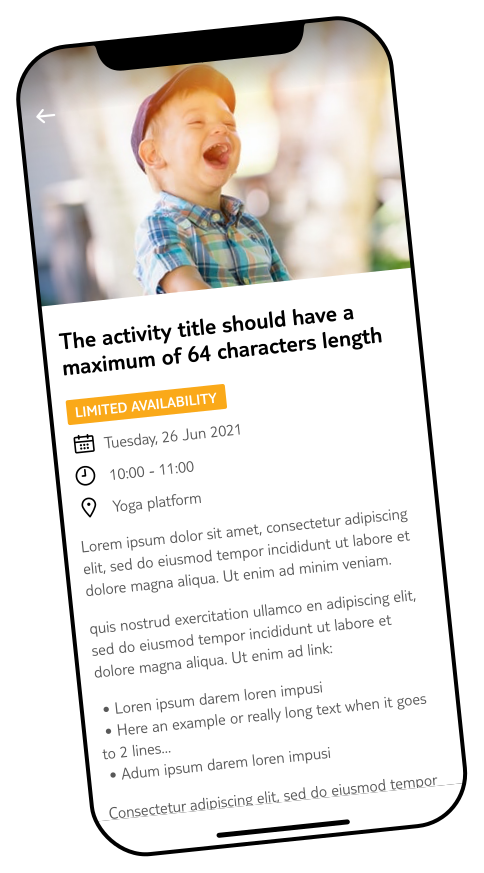
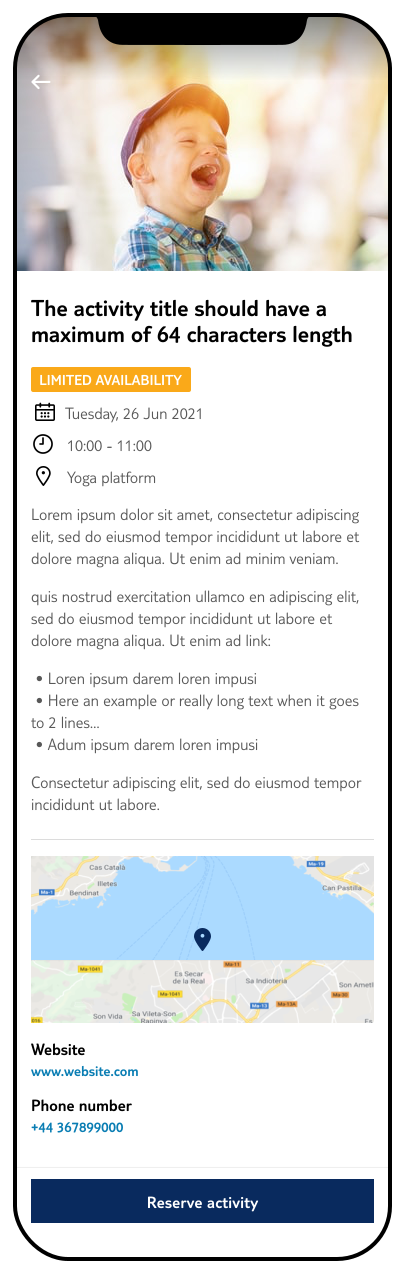
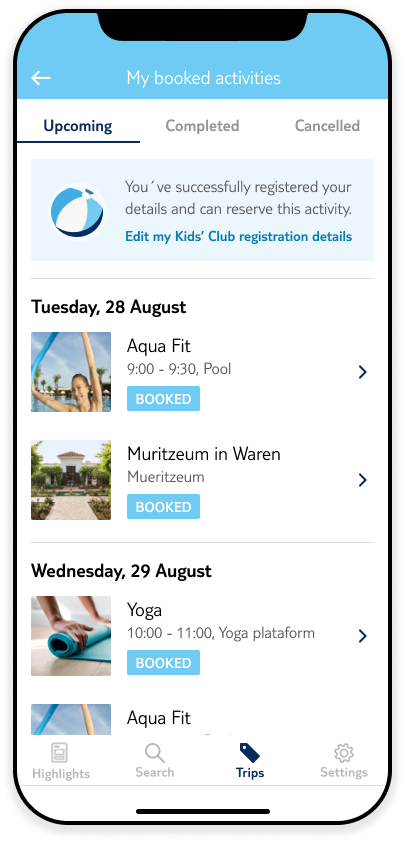
Parents browse the activity tab and surface kids' club options — previously buried. Improved discoverability drove initial engagement and pre-booking intent.
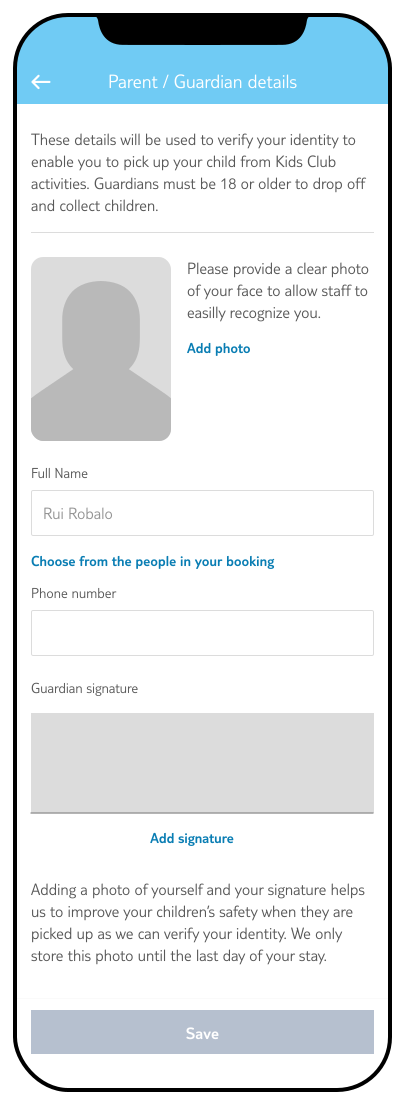
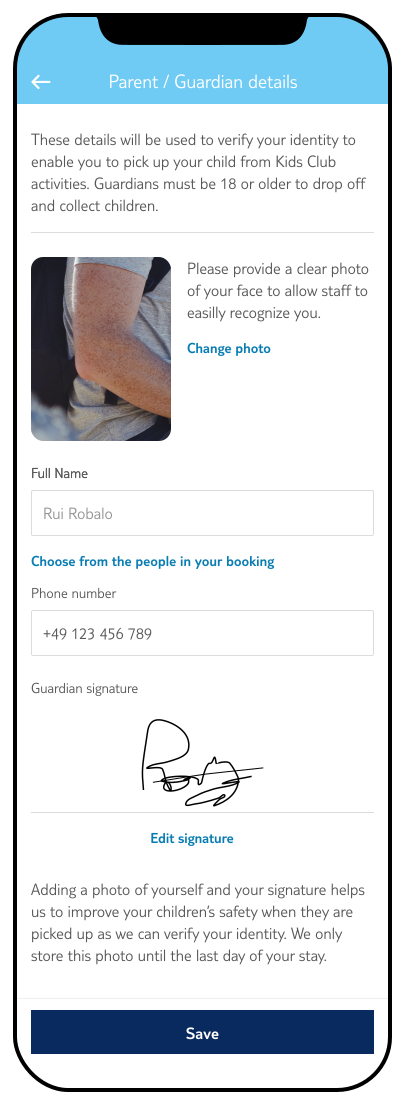
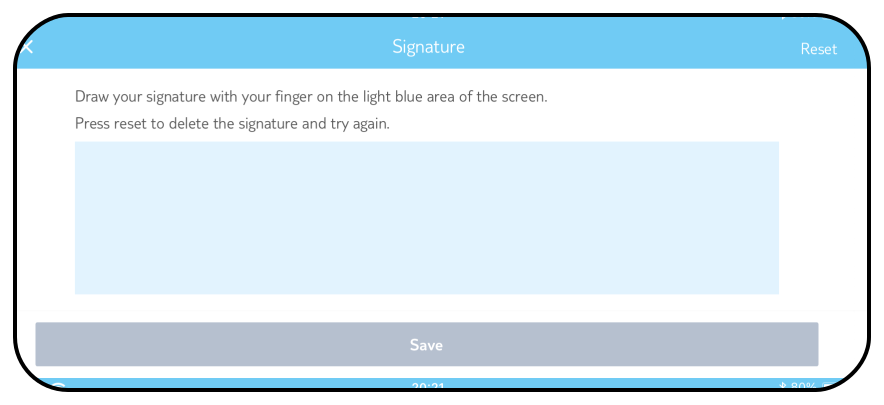
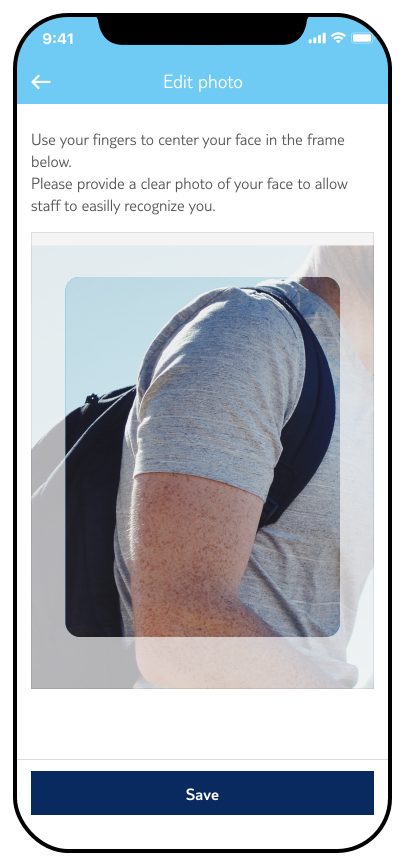
Parents complete their profile with a photo and in-app signature. The app shifts to landscape for a better signing experience — creating a strong identity layer.
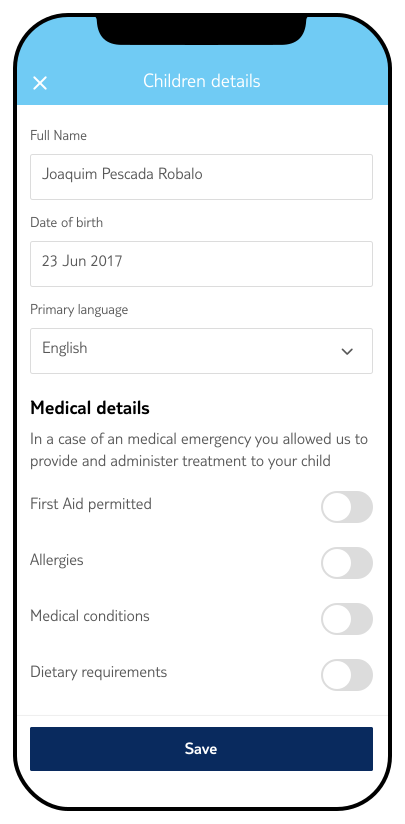
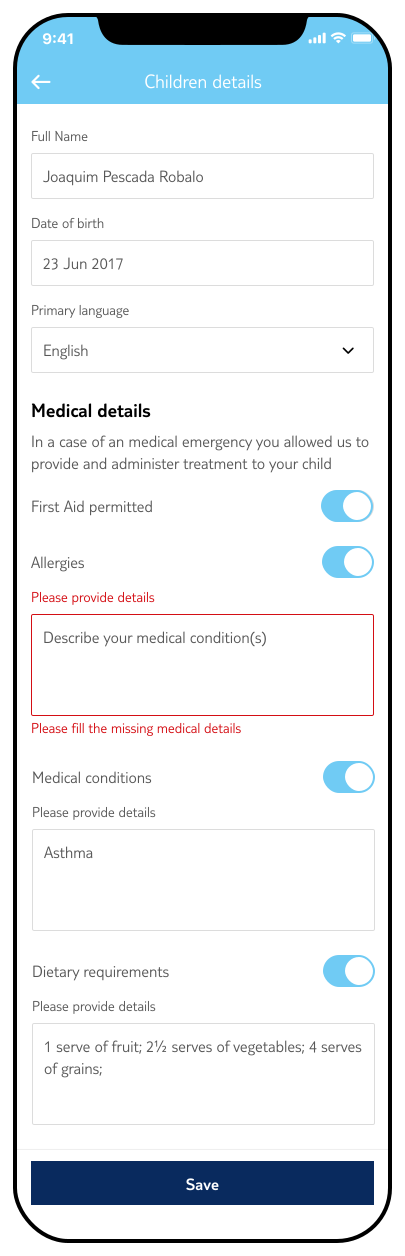
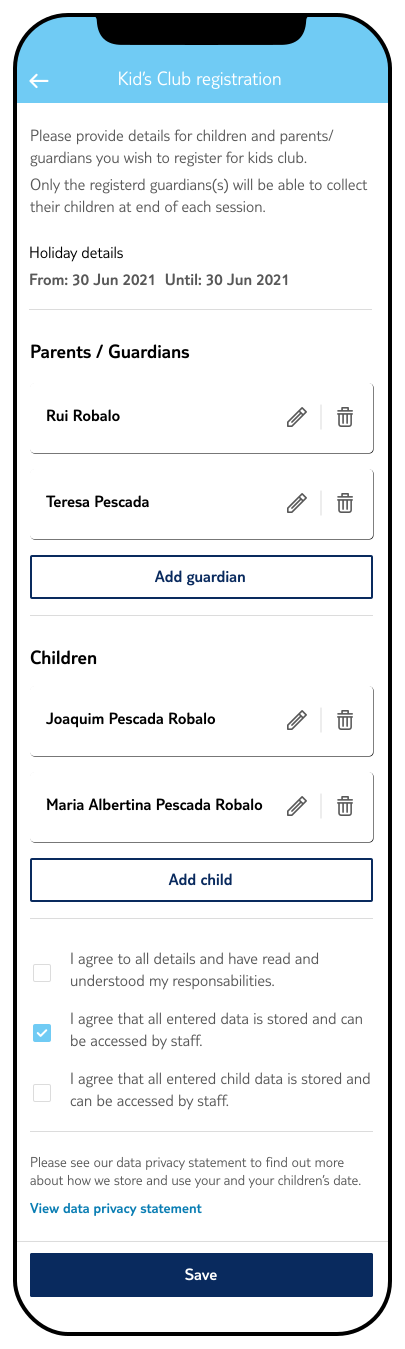
A focused form collects the child's name, date of birth, primary languages, and medical details including allergies, conditions, and dietary requirements.
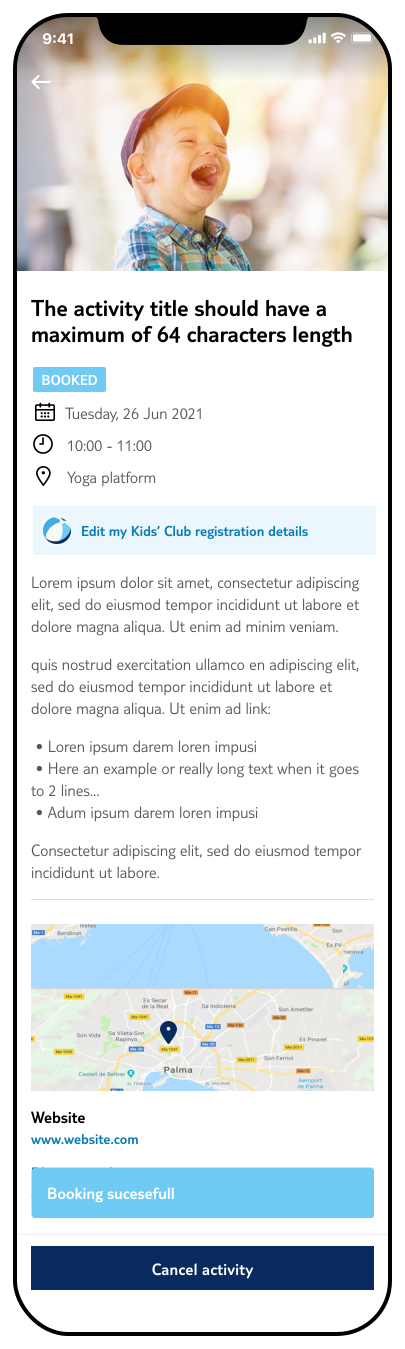
Submission triggers a toaster confirmation. All details are stored for future bookings — dramatically reducing friction for returning users.
Research was conducted in close collaboration with TUI resort representatives. We created the UI prototypes and defined the interview questions — reps then facilitated sessions with guests across 14 days in multiple resort locations. Interviews took place both at arrival and at point of activity drop-off, capturing real behavioural signals in context.
This dual-moment approach revealed nuanced pain points that wouldn't have surfaced in a lab setting: the chaos of arrival, the hesitation before committing a child to an unfamiliar service, and the surprise that the activities were completely free.
One early assumption — sending a confirmation code via SMS — was tested and discarded. Roaming costs created anxiety rather than confidence. The solution was redesigned to verify identity within the app itself.
On-site sessions with parents at arrival and during drop-off, across multiple resort locations over 14 days.
TUI resort reps facilitated all user interviews, providing direct access to customers in authentic holiday contexts.
Iterated on UI concepts based on live feedback — including the significant pivot away from SMS verification.
No existing digital solution existed in the market — the benchmark was the pen-and-paper process itself.
"I didn't even know this was free. I thought it would cost extra — I would have used it every day if I'd known."
— Jonh S. - Newcastle upon Tyne"I need a place where I can be sure that my two kids are secured ... (and) no one's trying to kidnapp them!"
— Terry W. - Croydon, LondonThe research surfaced a consistent pattern: parents wanted to use the service but didn't know it existed, didn't trust it enough to commit, or couldn't find the right moment to enrol. Trust was the most critical barrier — and it needed to be earned through the interface itself, not just through messaging.
Kids' club activities had no dedicated prominence in the app — parents stumbled upon them by chance, if at all.
Concerns around child safety — from injury to stranger anxiety — required the design to communicate security at every step.
Parents needed to verify that slots were still available and understand scheduling before committing personal data.
An SMS verification flow — initially designed for security — was abandoned after testing revealed it triggered anxiety about unexpected mobile charges abroad.
The design challenge was to build something that felt secure without feeling bureaucratic — and simple enough to complete quickly, even with children in tow. Every design decision was anchored to one of the four pain points identified in research.
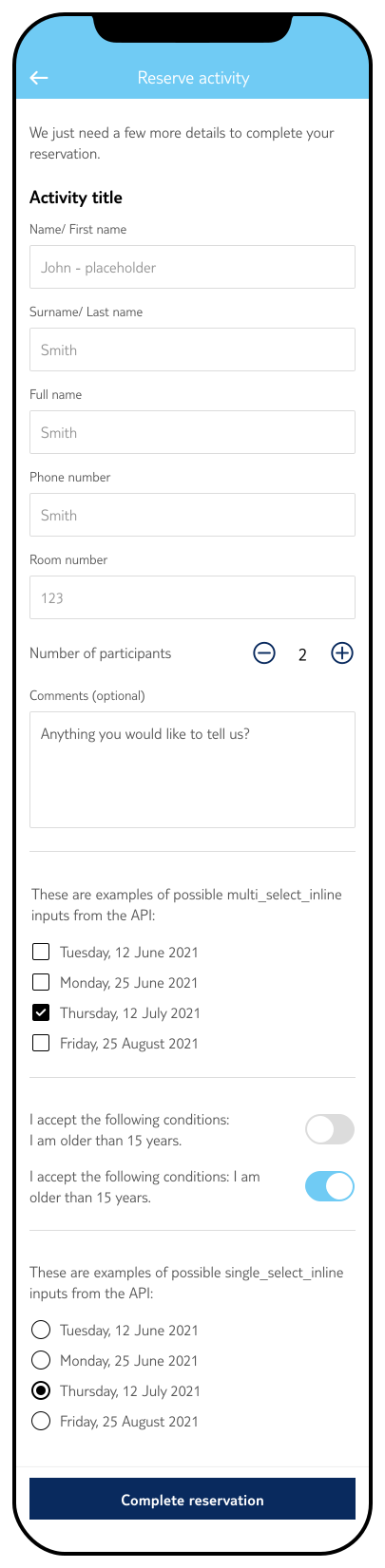
Parent selects the activity, number of participants, and preferred time. Availability is verified in real-time to prevent false starts.
Parent fills in personal details including a profile photo and in-app signature. A second guardian can be added. The app shifts to landscape for the signature step.
Child name, date of birth, primary languages, and full medical details (allergies, conditions, dietary requirements) are recorded in a clean, focused form.
Submission triggers an in-app toaster. All data is saved for future bookings, removing the need to re-enter information on subsequent visits.
The design system was deliberately kept consistent with the existing TUI app — too radical a departure would have undermined the feeling of security the experience needed to convey.
The child form captures essential safety information: name, date of birth, primary languages (to ensure effective communication with staff), and medical details including allergies, diagnosed conditions, and dietary requirements. Toggles allow parents to declare or dismiss each medical category clearly.
On submission, a toaster notification confirms the booking. The activity detail page updates to reflect the confirmed status, and the registered activity appears in the parent's itinerary.
The final flow addressed all four research findings in one connected system. Discoverability was solved by elevating kids' club activities within the activity tab — giving them clear categorisation and visual prominence. Trust was built through layered identity verification: a profile photo, a handwritten signature, and structured medical information communicated that the system took safety seriously.
The signature experience was a key design decision: rotating the app to landscape gave parents enough room to sign naturally, making the interaction feel deliberate and considered — not a checkbox to rush through. The image crop feature was also rebuilt to improve the photo upload quality for guardian profiles.
The decision to persist all data for future bookings was both a UX improvement and a conversion driver — parents who had already gone through the process once could re-book in seconds.
Parents are asked to provide a profile photo and a handwritten signature. The signature step rotates the device to landscape, giving users more room and making the interaction feel intentional.
The photo upload uses our rebuilt image crop feature for a higher-quality result.
Within the first two months of launch, the feature drove a 21% increase in conversions and a 44% uplift in in-app engagement with kids' activities. Resort staff reported an 83% increase in this type of booking, with a 94% full-booking completion rate — meaning the vast majority of parents who started the process completed it.
The toaster confirmation and persistent profile data proved to be high-value details: parents who had registered once could re-book subsequent activities with minimal effort, driving repeat engagement throughout their stay.
The most significant remaining opportunity lies outside the app: resort capacity. Feedback consistently pointed to a lack of available slots as a limiting factor for further growth. Increasing the number of vacancies per activity would unlock the full potential of the digital flow.
The decision to abandon SMS verification was the right call — but it meant placing all trust signals within the UI itself. In hindsight, that constraint produced a more coherent and confident design than the original two-channel approach would have.